How to Build a Website with AI — For Free (And Actually Get a Good Result)
Let's be honest. If you're a small business owner in New Zealand, "getting a website sorted" has probably been on your to-do list for longer than you'd like to admit.
Maybe you've had quotes that made your eyes water. Maybe you've tried a drag-and-drop builder and given up after an hour of frustration. Or maybe you've just been too flat-out running your business to even think about it.
Here's the thing — that excuse just got a lot harder to hold onto.
AI tools like Claude, ChatGPT, and Google Gemini have quietly become incredibly capable at building websites. We're talking clean, professional, one-page websites — written, designed, and structured — in minutes. Not days. Not weeks. Minutes.
But there's a catch.
The Problem with AI Website Builders
The quality of what AI produces depends almost entirely on what you tell it.
Give it a vague prompt like "make me a website for my plumbing business" and you'll get something generic, bland, and probably a bit embarrassing. Give it a detailed, well-structured prompt — covering your services, your audience, your tone, your design preferences — and the result is genuinely impressive.
The problem? Most business owners aren't copywriters or prompt engineers. Writing a great AI prompt from scratch takes time, skill, and a lot of trial and error.
That's exactly the gap we built a tool to fill.
Introducing the PIXELWEB Free AI Website Prompt Generator
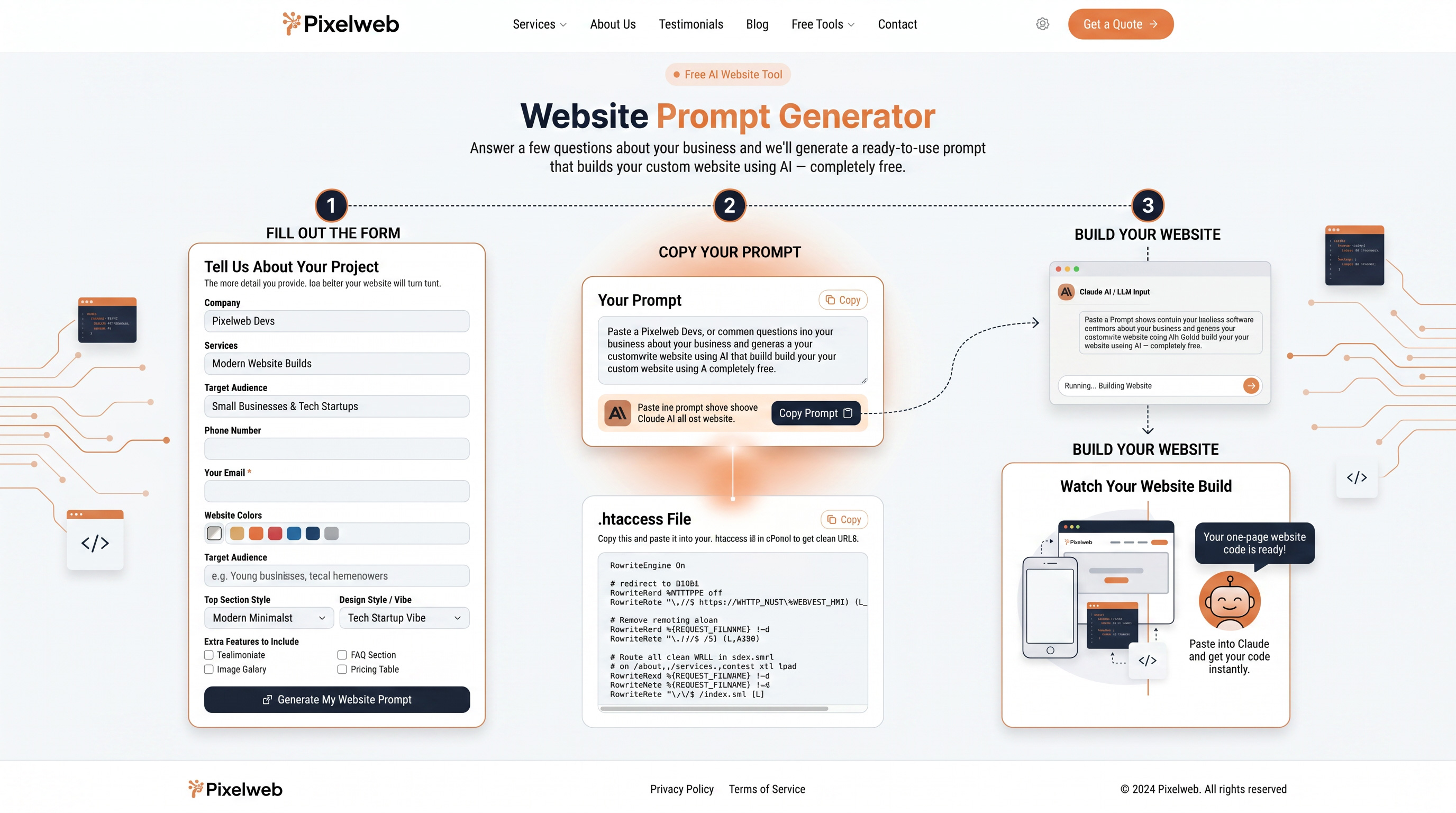
We've created a free online tool that generates a ready-to-use AI prompt for your business website — no technical knowledge required.
Here's how it works:
Step 1: Fill in the form
Answer a few simple questions about your business. Things like:
- Your business name and what you do
- The services you offer
- Your target audience
- Your preferred design style (modern and minimal? bold and corporate? playful and creative?)
- Any extra features you want — testimonials, FAQs, a pricing table, image gallery
It takes about two minutes. If you know your business (and you do), you can answer every question without thinking too hard.
Step 2: Get your custom prompt
Hit the button and our tool generates a detailed, high-quality prompt — built specifically around your business and designed to get the best possible result from any AI tool.
Step 3: Paste it into AI
Copy the prompt and paste it into Claude AI, ChatGPT, or Google Gemini. Watch it build your website, right in front of you.
That's it.
👉 Try the Free AI Website Prompt Generator here
Why a Good Prompt Makes All the Difference
Think of AI like a very talented, very fast assistant who does exactly what they're told — no more, no less.
If you walk in and say "build me a website," it'll build you a website. If you walk in and say "build me a professional, modern one-page website for a Wellington-based landscaping company targeting residential homeowners, with a hero section featuring a bold headline, a services section with icons, a testimonials section, and a contact form — using a colour palette of deep green and off-white" — that assistant is going to produce something genuinely impressive.
The PIXELWEB prompt generator is built to get you to that second type of prompt, automatically. We've done the thinking about what AI needs to know to build something worth having, so you don't have to.
Who Is This Tool For?
This tool was built with New Zealand small businesses in mind. It's ideal if you're:
- A tradie (plumber, electrician, builder, painter) who just needs a clean page to send customers to
- A consultant or freelancer who wants to look professional online without spending thousands
- A new business getting started and needing a web presence fast
- A retailer or hospitality operator who wants something simple alongside their social media
- Anyone running a side hustle that deserves its own corner of the internet
If you've been waiting until you "have time" or "have the budget" — this is your moment.
What Happens After You Get Your Prompt?
Once AI builds your website, you'll have the HTML file ready to go. To get it live on the internet, you'll need two things:
- A domain name — your web address (e.g. yourbusiness.co.nz)
- Web hosting — a server to put your website on so the world can see it
If you're comfortable setting those up yourself, our tool also provides a ready-to-use .htaccess file to handle clean URLs once you upload your site to cPanel.
And if that last sentence made your eyes glaze over a little — that's perfectly fine. That's what we're here for.
Not a Tech Person? We've Got You.
At PIXELWEB, we work with NZ businesses every day who just want things sorted — without the jargon, the back-and-forth, or the mystery invoices.
If you use the prompt generator and love the result but don't want to deal with the technical side of going live, we can handle all of it for you:
✅ Setting up your domain name ✅ Getting your web hosting sorted ✅ Uploading and launching your site ✅ Making sure everything works properly across mobile and desktop
Or if you want to take things further — a more advanced website, an online store, digital marketing, AI voice agents — we do all of that too.
We take care of the boring (but important) stuff so you can get back to running your business.
Get in touch with the PIXELWEB team — we're based in New Zealand, easy to talk to, and we won't waste your time.
Ready to Get Your Business Online?
There's never been a better time — or an easier way — to get a professional website up and running in New Zealand.
The AI does the building. Our tool writes the instructions. You just fill in the form.
Try the Free AI Website Prompt Generator — it takes 2 minutes
PIXELWEB is a New Zealand digital agency offering website design, Shopify eCommerce, digital marketing, UGC videos, and AI-powered tools for NZ businesses. Learn more about what we do.